
[PRODUCT NAME] — [CURRENT PRICE] Regular price [REGULAR PRICE]
Newsletter Business Operating System

Stop Starting Your Newsletter Business From Scratch Every Time You Open AI.

Tell [PRODUCT NAME] about your business once. Then use one connected workspace to plan, create, grow, monetize, measure and improve - with visual creation studios, implementation training, and Maya, Alex & Sophie ready when you need specialist help.

Tell the system about your business once
Know what to work on next
Create the actual assets inside the OS
Bring in the right AI specialist when needed
Save and reopen finished work
Learn while you build
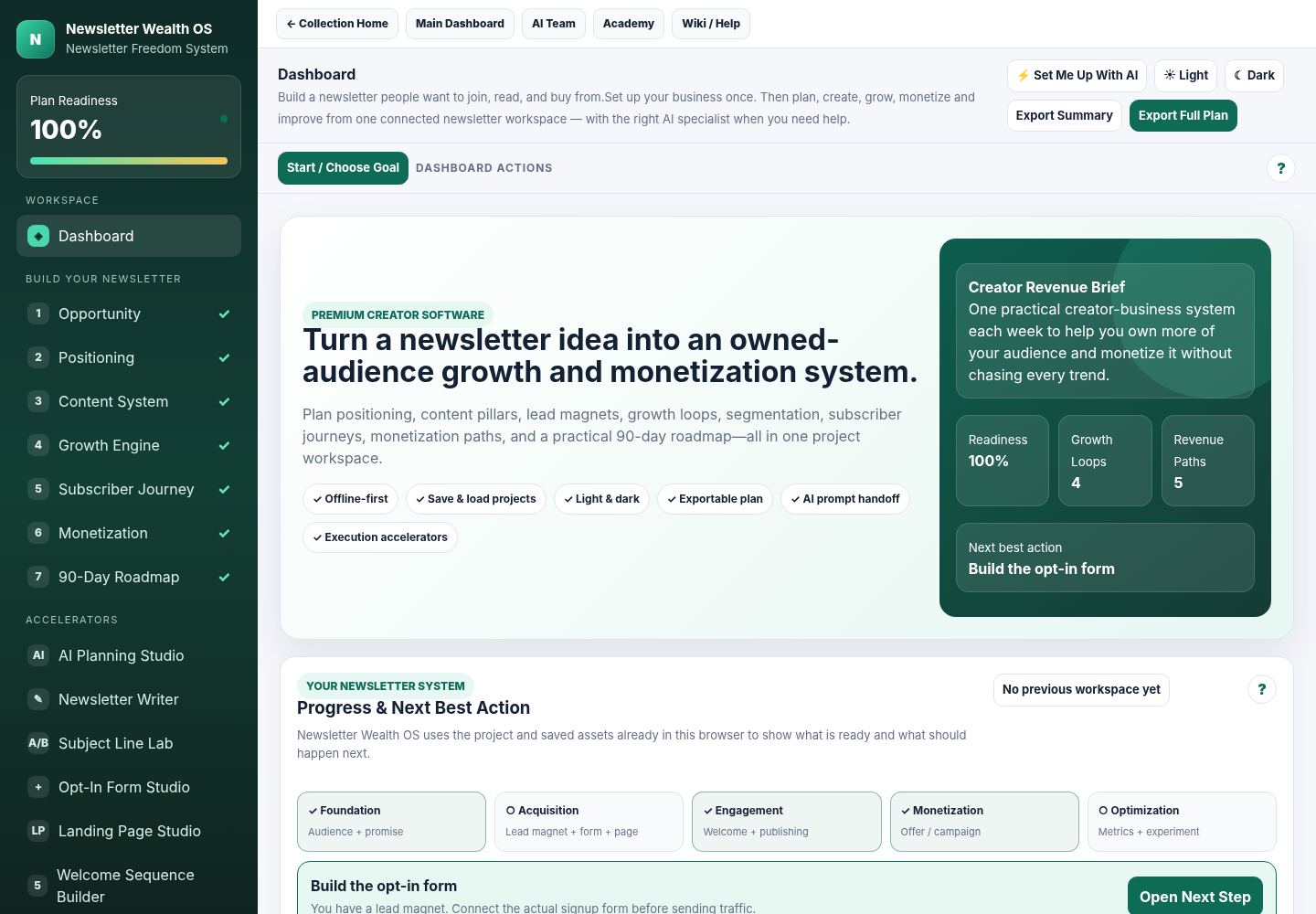
Actual Newsletter Wealth OS dashboard with project readiness, Next Best Action and connected workspaces
Real software. Real workflow. Real continuity. This is the current Newsletter Wealth OS - where project context, progress guidance, saved work and the Next Best Action stay connected.
Get [PRODUCT NAME]Get the complete connected newsletter-business system.
[REGULAR PRICE] regular→[CURRENT PRICE]
Why A Newsletter Business?

Because A Newsletter Gives You A Direct Way To Turn Attention Into An Ongoing Relationship You Can Keep Building.

The value is not simply “send more emails.” A well-run newsletter can give you a repeatable way to educate prospects, stay useful between purchases, bring people back to your ideas and offers, learn what your audience responds to and create continuity across your marketing.

Build A Direct Audience

Develop an ongoing communication channel with people who intentionally chose to hear from you.

Stay Relevant Between Launches

Use regular useful communication to keep the relationship active rather than disappearing until the next promotion.

Support Products, Services & Offers

When you have something relevant to promote, you already have an audience relationship and a channel to work from.

Learn What Your Market Responds To

Use real engagement and campaign data from your email platform to improve what you publish, promote and test next.

This is especially useful if you are: a small business owner, creator, consultant, coach, author, ecommerce operator, affiliate marketer, service provider or subject-matter expert who wants an audience asset you can keep nurturing over time.
The Real Problem

The Problem Is Not That You Need Better Prompts. It Is That Every Prompt Starts Without The System Around It.

ChatGPT and Claude are powerful. But a newsletter business is bigger than one conversation. Every time you reopen a blank chat, you can end up re-explaining the audience, offer, goals and constraints - while your pages, emails, growth plans, metrics and next steps live somewhere else. The AI may be smart. The workflow around it is still fragmented.

The fragmented way

  • Re-explain the business in new chats
  • Jump between prompts, documents and page tools
  • Wonder which task should come next
  • Lose finished assets in folders and chat histories
  • Learn from courses separately from doing the work
  • Get advice without an obvious execution path

The connected operating-system way

  • Keep one persistent project context
  • Move through guided newsletter-business workflows
  • See a recommended Next Best Action
  • Create pages, forms, lead magnets and emails visually
  • Save work in the Content Vault and continue later
  • Bring in Maya, Alex or Sophie exactly where they fit
The Belief Shift

You do not need another pile of prompts. You need continuity.

One business context. One guided workflow. One place to create the assets. One library that remembers the work. One clear next step. And the right specialist brought in only when the job calls for it.

The Mechanism

Tell It Once. Then Move Through One Connected Loop Instead Of Starting Over.

That is the mechanism behind [PRODUCT NAME]. The software keeps the operating context together, guides the next move, gives you visual production workspaces, saves the asset, and reconnects the result to measurement and the next decision.

Tell It Once
Get Guided
Create
Get Specialist Help
Save
Measure
Improve
1

Set Up Your Project

Use Guided Setup, AI-Assisted Setup or start from a structural template. You do not need to complete every field before getting value.

2

Follow The Right Next Step

The system reflects what is already complete and recommends the next useful workspace instead of dumping you into a toolbox.

3

Create The Actual Asset

Build forms, landing pages, lead magnets and emails in visual studios — not just in prompt boxes.

4

Save, Improve & Continue

Store assets in the Vault, reopen them later, use real metrics to choose a test, and bring in the relevant specialist when needed.

Picture the difference: you open the system tomorrow, see the project you already started, reopen yesterday's asset, and immediately know the next logical move - without rebuilding the context from scratch.
Why Not Just Use ChatGPT?

Because A Powerful Conversation Is Not The Same Thing As A Persistent Operating System.

Use ChatGPT or Claude when you want AI help. [PRODUCT NAME] gives those conversations the structure around them: the saved business context, the actual production workspace, the asset library, the training, the specialist role and the next action.

ChatGPT / Claude

Excellent for the conversation.

  • Generate ideas, copy and analysis
  • Work through one request at a time
  • Useful whenever you know what to ask
  • Flexible enough to help with almost anything
[PRODUCT NAME]

Built for the newsletter-business workflow around the conversation.

  • Keeps the project context together
  • Guides what to do next
  • Lets you build the actual page, form, lead magnet or email
  • Saves and reopens the work
  • Routes the right job to Maya, Alex or Sophie
  • Connects metrics back to the next action
Actual Product Screens

Do Not Take The Operating-System Claim On Faith. Look Inside It.

These are current product screens. Each one exists to remove a specific kind of friction: starting from blank, building in disconnected tools, losing the asset after the chat, or collecting numbers without knowing what to do next.

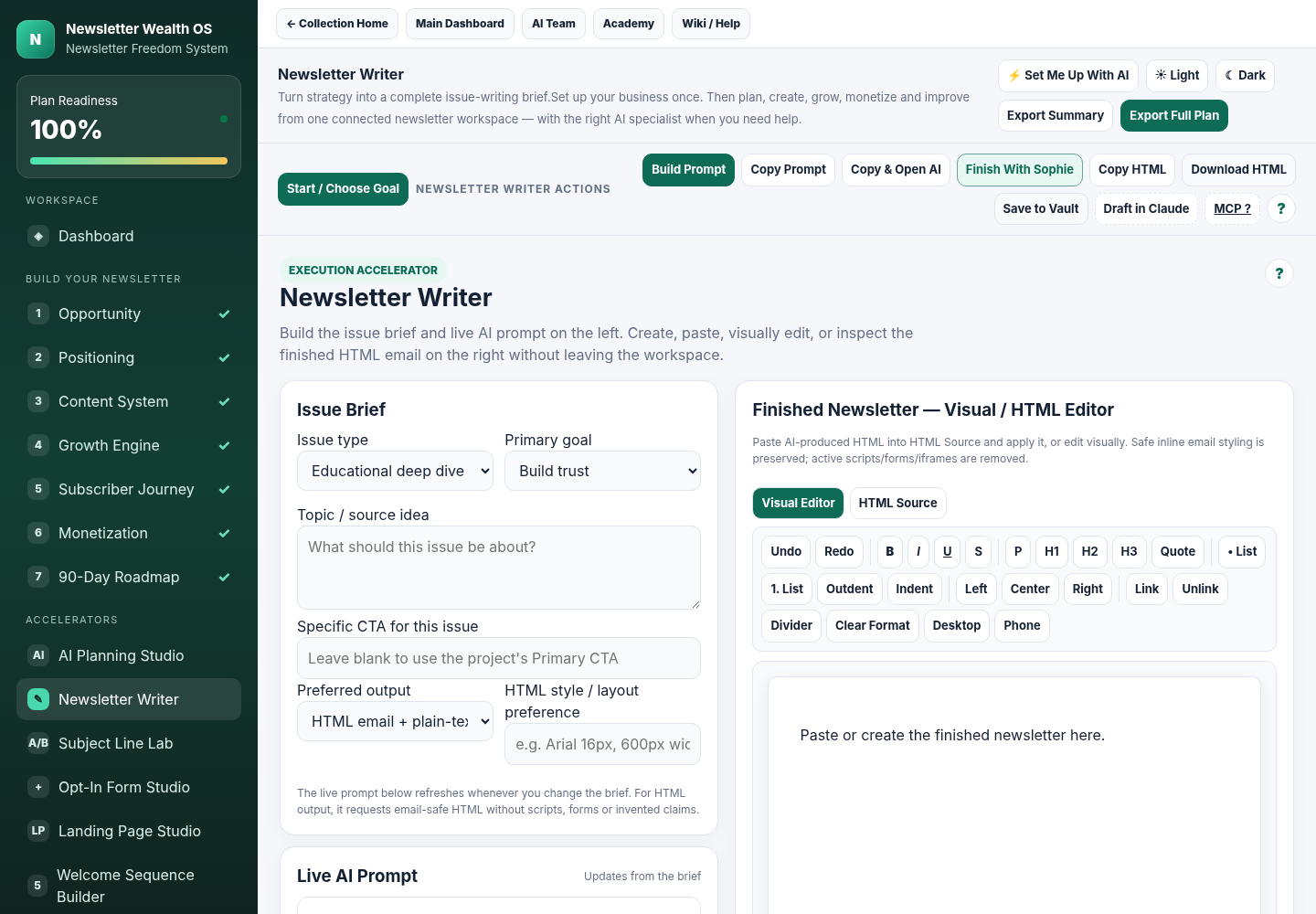
Actual Newsletter Writer workspace showing Issue Brief, live AI prompt actions and Visual HTML Editor
Newsletter Writer + Visual / HTML EditorBuild the brief and live AI prompt on the left, then create, paste, edit or inspect the finished HTML email on the right.Go from issue brief -> live AI prompt -> finished visual/HTML email in the same workspace.
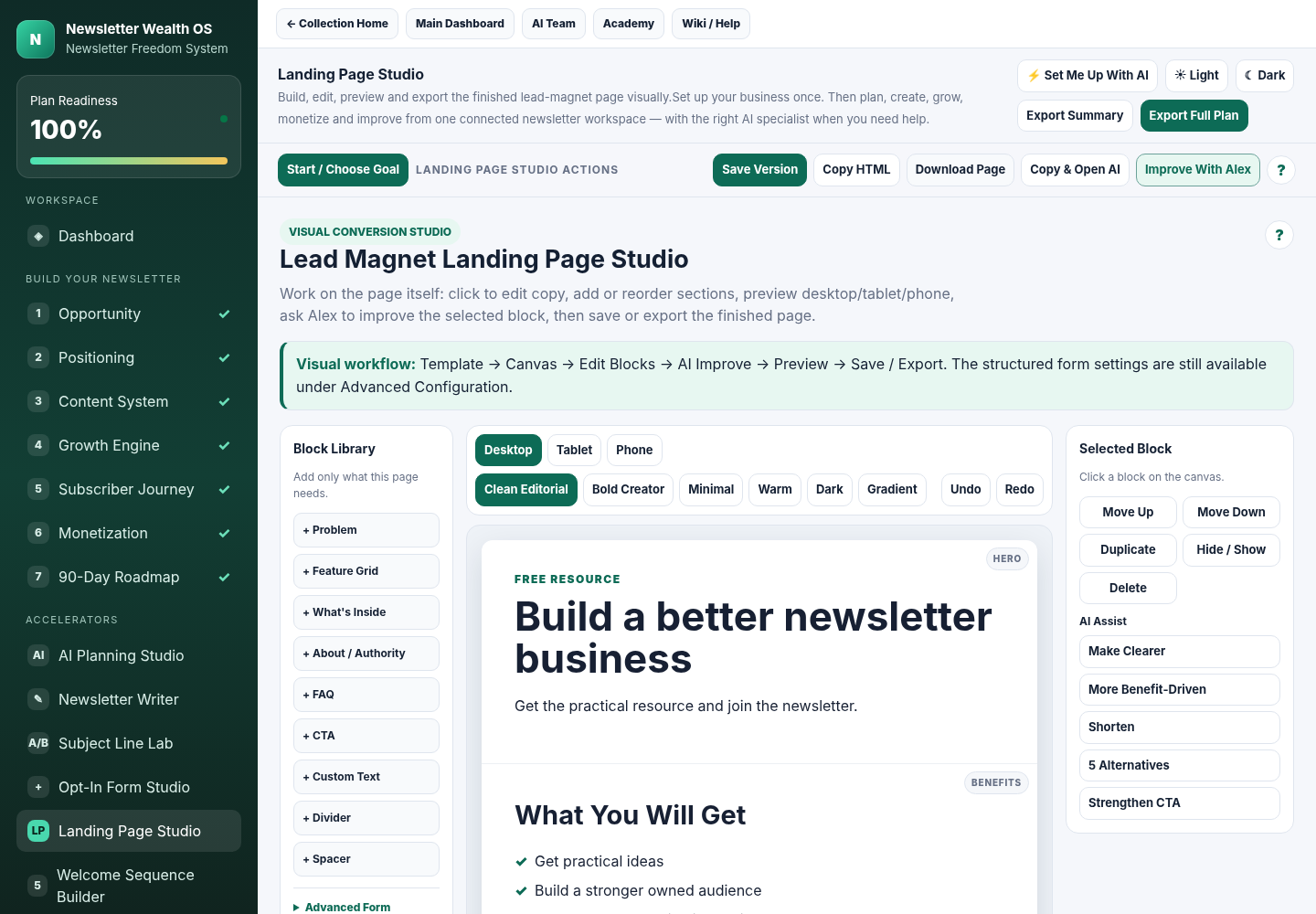
Actual Landing Page Studio showing block library, visual page canvas, themes and AI assist
Lead Magnet Landing Page StudioEdit the real page canvas, add or reorder blocks, preview devices, save versions, export HTML and improve selected sections with Alex.Build the page visually instead of stitching together copy, prompts and page code in separate tools.
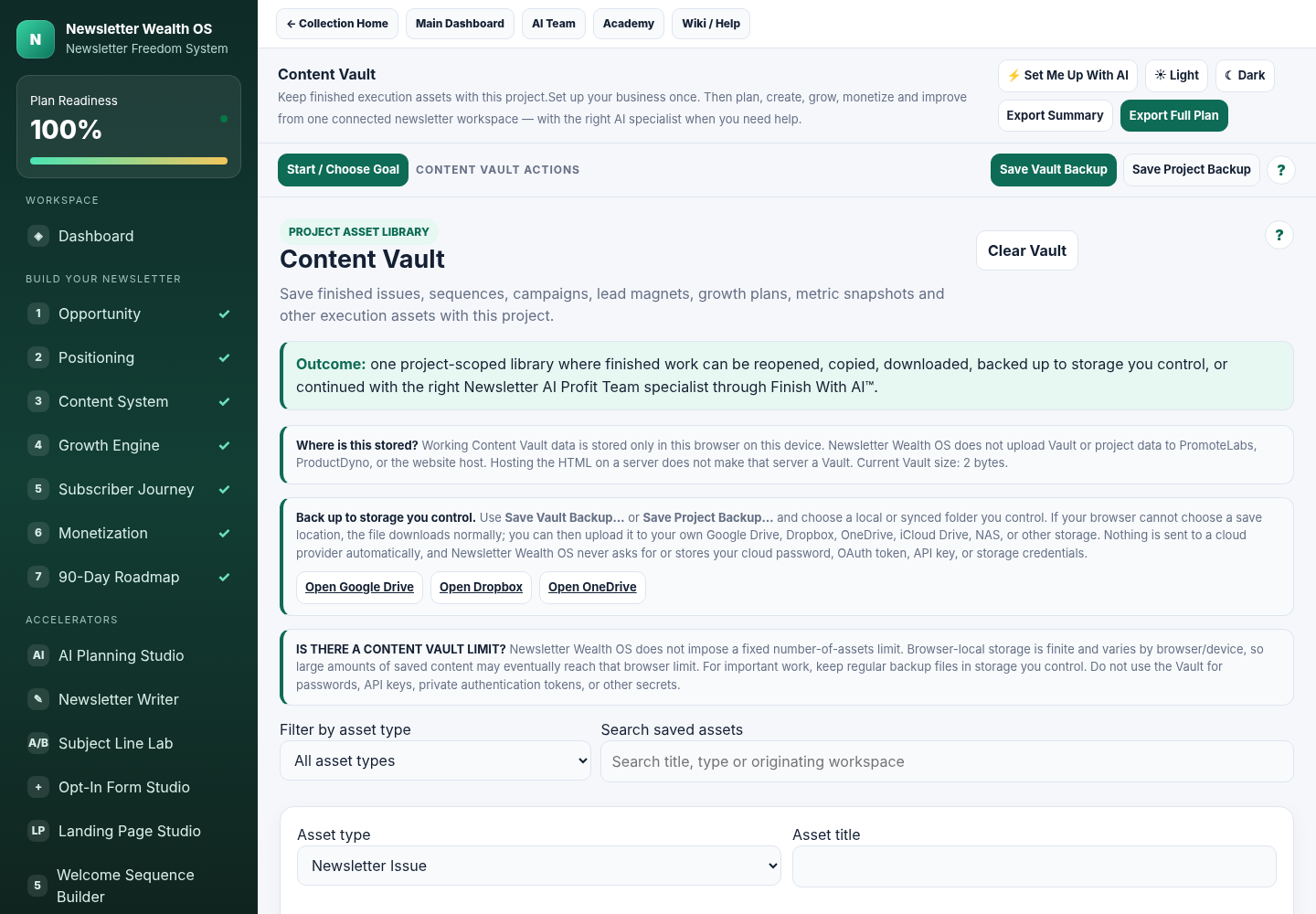
Actual Content Vault workspace for filtering, searching and continuing saved newsletter assets
Content Vault + ContinuationSaved work stays organized by asset and workspace so you can reopen the next job instead of rebuilding from chat history.The asset does not disappear when the chat ends. Save it, find it, reopen it and continue.
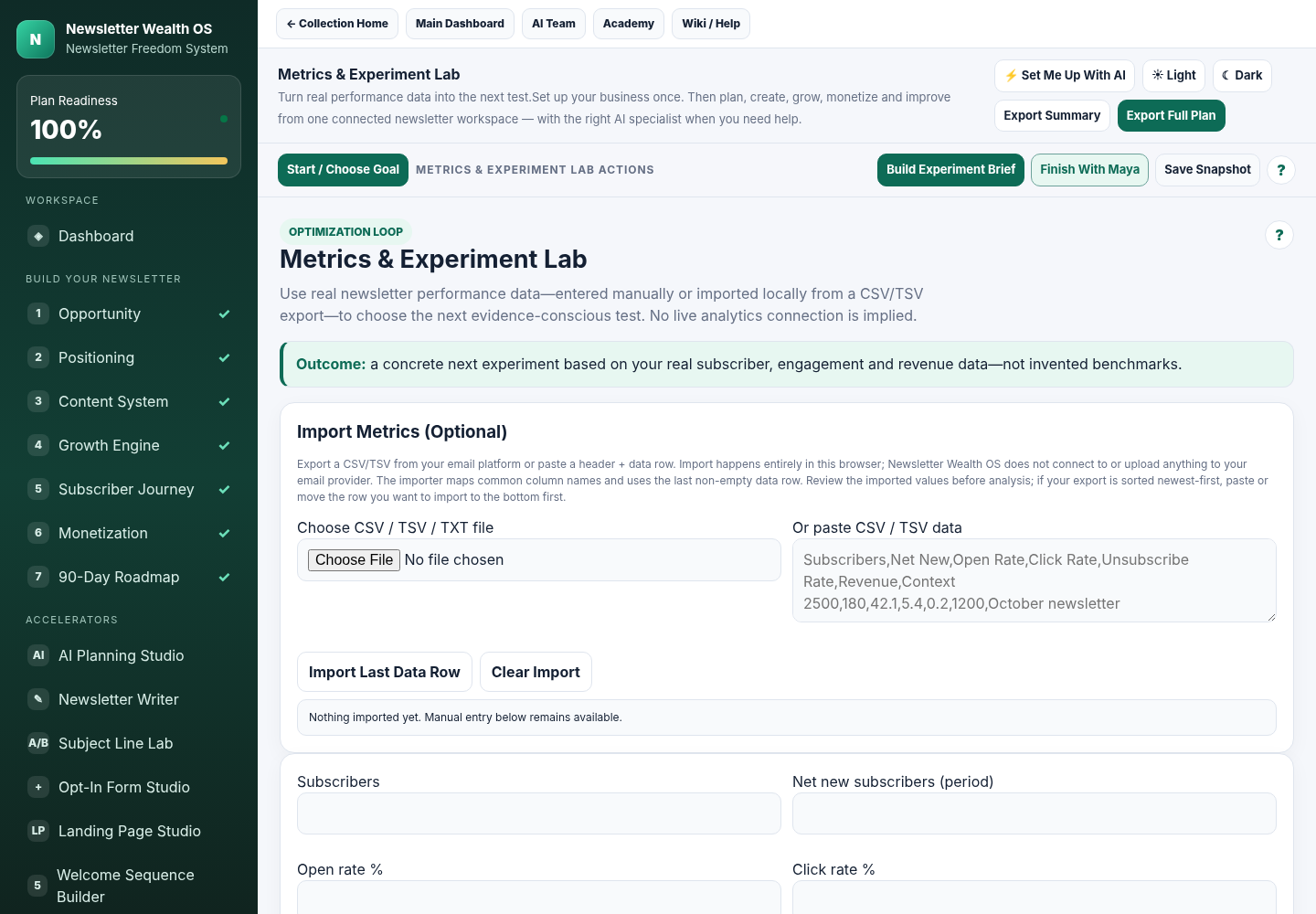
Actual Metrics and Experiment Lab using real newsletter metrics to recommend the next focused action
Metrics -> Recommendation -> Next ActionEnter or import your real numbers, create the next experiment brief and route into the workspace that addresses the next problem.Your numbers lead to the next experiment and the next workspace - not another dashboard you ignore.

And The Software Is Only One Part Of The Member Experience.

The implementation Academy and specialist AI Team sit beside the OS so learning, execution and specialist help stay connected.

Screens shown from the current audited product build. Final hosted appearance can vary slightly by browser and member-area wrapper.

Set up the business once — then keep building from the same system.

Use the OS for the work, the Academy for the method, and the right AI specialist when you want help finishing the next asset.

See Everything Included
Newsletter Wealth OS

One Workspace For The Business Behind The Newsletter.

This is not merely a newsletter text generator. Newsletter Wealth OS covers the operating decisions and execution work around the newsletter — from opportunity and positioning through acquisition, subscriber journey, monetization and optimization.

1
Guided Start + Next Best ActionChoose a goal, see system progress, reopen the last active workspace and get the next logical move based on existing project state.
2
Persistent project contextAudience, offer, positioning, growth strategy, content direction and other project details stay available without starting from zero each time.
3
Consistent workspace action barPrimary actions, AI handoffs, saving and contextual help stay in one predictable place across the OS.
4
Contextual Academy learningOpen the relevant training concept from the workspace you are using instead of searching through a course manually.
Newsletter Wealth OSStart / Choose Goal
Dashboard
Newsletter Writer
Landing Studio
Welcome Sequence
Growth Planner
Metrics Lab
Content Vault
Primary ActionCopy & Open AISave? Help

Project Progress

Foundation complete. Lead magnet created. Landing page not yet saved.

Recommended next step: Build the landing page and connect your opt-in form.

Create, See, Edit, Export

The Creation Tools Now Work More Like Studios — Not Static Prompt Forms.

The system gives you production surfaces for the assets that matter most. AI can help with the copy, but you can see and edit the finished asset inside the product.

▣

Landing Page Studio

Inline editing, reusable blocks, reorder/hide/duplicate/delete, themes, undo/redo, device previews, Quick Connect form settings and standalone HTML export.

+

Opt-In Form Studio

Visual form editing, Content / Connection / Design controls, device previews, form-code Quick Connect and standalone form export.

✦

Lead Magnet Studio

Visual document editing, formatting, document styles, Vault saving, text/HTML export and print-to-PDF workflow.

✉

HTML Email Workspaces

Newsletter Writer and Welcome Sequence Builder combine a live AI prompt with full Visual/HTML editing, rich formatting, source editing, copy and download.

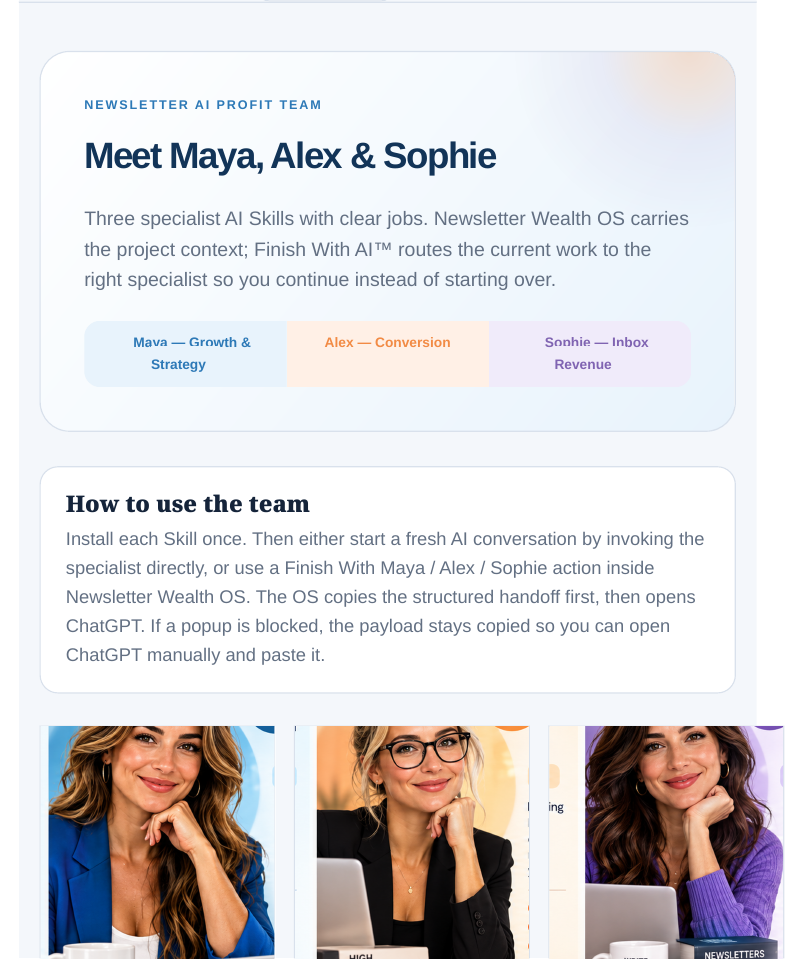
Your Newsletter AI Profit Team

Three Specialists. Three Different Jobs. No Need To Force Every Problem Through One Generic Assistant.

Maya, Alex and Sophie each have a defined job. Newsletter Wealth OS prepares the context and hands the right work to the right specialist instead of forcing every problem through the same generic prompt.

Maya — Chief Subscriber Growth Officer

Maya

Chief Subscriber Growth Officer

Growth strategy, subscriber acquisition, channel choices, experiments and measurement. Maya helps prioritize what to do now, what to do next, what to ignore, and what to measure.

Outcome: stop guessing which growth channel deserves your attention next.

Alex — Chief Conversion Officer

Alex

Chief Conversion Officer

Lead magnets, opt-in experiences, landing pages, conversion assets and subscriber offers. Alex helps turn strategy into finished conversion copy and assets.

Outcome: turn strategy into the actual conversion asset the subscriber will see.
Sophie — Chief Inbox Revenue Officer

Sophie

Chief Inbox Revenue Officer

Newsletter issues, welcome sequences, nurture, promotions and inbox monetization. Sophie is built to return usable email deliverables instead of long theory first.

Outcome: turn the idea into emails you can actually send and monetize.
Finish With AI™

Finish With AI™ Means The Prompt Is The Bridge - Not The Product.

Newsletter Wealth OS prepares a visible handoff containing the project context, current asset, objective and constraints. You choose when to copy it into ChatGPT or Claude. The specialist is instructed to return the finished usable deliverable first — and then point you back to the next action inside Newsletter Wealth OS.

SPECIALIST: Sophie — Chief Inbox Revenue Officer WORKFLOW: Welcome Sequence Builder PROJECT CONTEXT: [your saved context] CURRENT ASSET: [your current draft] REQUESTED ACTION: Finish the sequence CONSTRAINTS: Do not invent proof, scarcity or results OUTPUT FIRST: Return the finished usable email sequence. NEXT ACTION IN NEWSLETTER WEALTH OS: Tell me which workspace to open next.
Build While You Learn

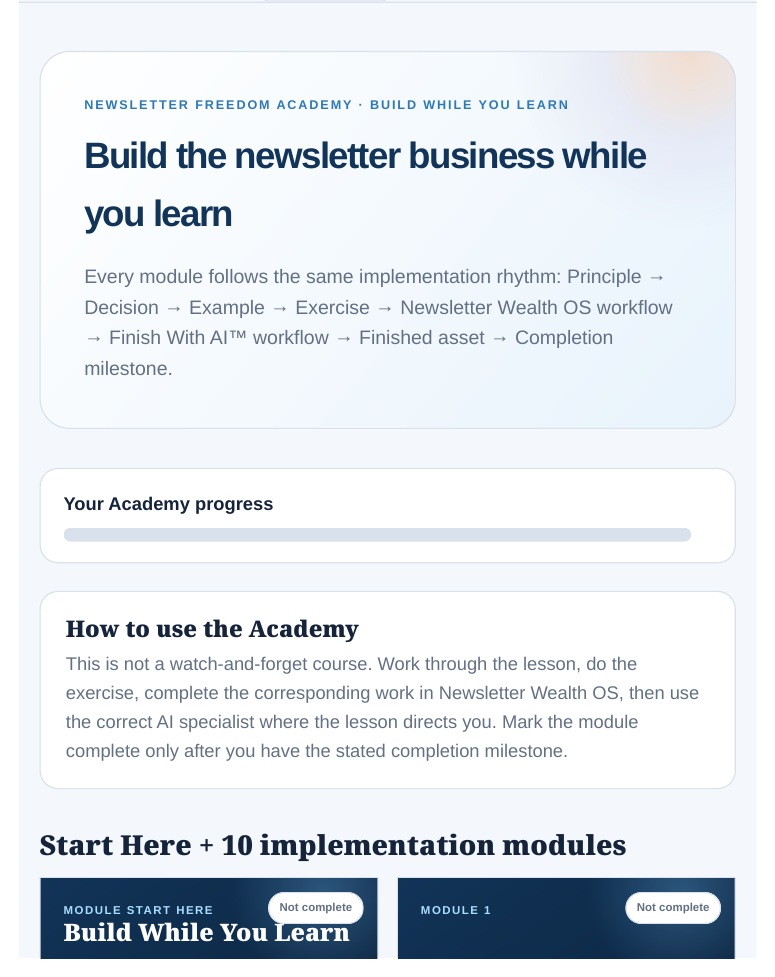
Newsletter Freedom Academy

Foundation • Subscriber • Offer • Conversion • Welcome • Newsletter • Content OS • Growth • Monetization • Retain / Optimize / Scale
Implementation Academy

Most Courses Teach You Something And Send You Somewhere Else To Do It. This One Sits Beside The System Where You Build It.

Learn the concept, make the decision, open the matching Newsletter Wealth OS workspace, build the asset, and bring in the right specialist when useful. The training and execution environment are designed to point back to each other.

✓
10 implementation modulesFrom foundation and subscriber strategy through monetization, optimization and scale.
✓
Build-While-You-Learn structureExercises connect directly to OS workspaces and finished outputs.
✓
Contextual learning inside the OSRelevant “Learn This” guidance is surfaced from the workspace where the concept matters.
Subscriber Growth Library

101 Growth Tactics — So “Grow My List” Doesn't Mean “Try Everything.”

The system includes a 101-tactic growth library, but the point is not to use 101 channels. Maya and the Subscriber Growth Planner help narrow the field so you can choose focused experiments that fit your business, time and budget.

Earned Growth

Content, referrals, partnerships, visibility and distribution loops you can build over time.

Partner / JV Growth

Use relevant relationships, cross-promotions and audience alignment instead of starting cold.

Paid Growth

Plan paid acquisition deliberately when the economics and conversion path justify it — not because a budget exists.

Why It Feels Like A System

The Work Stays Connected After You Create It.

This is where the operating-system idea becomes tangible. The assets, next steps and metrics are designed to feed into one another instead of becoming isolated outputs.

Content Vault

Save newsletter issues, landing pages, lead magnets, sequences, growth plans, experiments and AI handoffs. Filter/search assets, see where they came from, and continue editing in the originating workspace.

Metrics -> Next Action

Enter real data manually or import local CSV/TSV exports. The Lab turns that data into an evidence-conscious experiment and routes you toward the relevant workspace or specialist.

Project Backups

Working project and Vault data stays browser-local by default. Export backups to your own storage when you choose. No separate hosted Vault account is required for the browser-local workflow.

This is what continuity feels like: the page you built yesterday, the welcome sequence you drafted last week, the metric you entered today and the next recommendation all belong to the same project instead of four disconnected sessions.
Who Is This For?

For People Who Want A Newsletter To Become A Real Business Asset — Not Another Content Chore.

Whether you are starting from zero or already publishing, the system is built for the moment when you want the newsletter to do more than “send emails.” Use it to attract subscribers, create the assets that support the relationship, publish consistently, test growth ideas, promote relevant offers and keep improving without rebuilding the whole workflow every week.

This is a strong fit if you…

  • want to build a newsletter as a real business asset
  • like using AI but hate starting every conversation from zero
  • want actual visual creation tools, not only prompt libraries
  • want a guided path without being forced through one rigid sequence
  • want your training, execution tools and AI help connected

This is probably not what you're looking for if you…

  • only want a one-off newsletter prompt
  • want a fully autonomous service that runs external AI without your involvement
  • expect direct live analytics integrations with every email platform
  • want software to invent proof, results or business facts for you
Already using an email platform? You do not have to replace it. The core OS is platform-agnostic: create and export the assets locally, copy finished HTML into your email editor, use Quick Connect with compatible standard form/embed code, and import metrics from local CSV/TSV exports when you want the system to help plan the next experiment.
What Happens After You Buy?

You Do Not Have To Figure Out The Whole System Before You Can Use It.

Your first session is designed to get you oriented, into the right workspace, and working on the one newsletter job that matters now — without forcing you through the entire system first.

1

Open The Dashboard

Choose Build in Newsletter Wealth OS, Learn in the Academy, Work With the AI Team, or start from a specific goal.

2

Set The Core Context

Use Guided Setup, AI-Assisted Setup or a structural template so the system understands the project you are building.

3

Build The First Useful Asset

Jump into the Writer, Landing Studio, Opt-In Studio, Lead Magnet Studio, Growth Planner or another workspace that matches your goal.

4

Save It And Keep Going

Put finished work in the Content Vault, reopen it later, and let Next Best Action point toward the next logical move.

You do not need to master the whole system on day one. Start with the job in front of you. The operating-system value grows as your project context, saved assets, metrics and next actions begin connecting over time.
The Complete [PRODUCT NAME]

You Are Not Buying A Folder Of Tools. You Are Getting The Connected System Around The Work.

The operating software, production studios, implementation training and specialist AI workflow all serve the same newsletter project — so each component has a clear job instead of feeling like another disconnected bonus.

Your [PRODUCT NAME] Includes:

1. Plan & Position

Decide what you are building and where to focus.

  • Newsletter Wealth OS
  • Guided Start + Next Best Action
  • Opportunity / positioning workflows
  • Contextual Wiki Help

2. Create

Turn the strategy into assets people can actually see and use.

  • Visual Landing Page Studio
  • Visual Opt-In Form Studio
  • Lead Magnet Visual Document Studio
  • Visual / HTML Newsletter Writer
  • Visual / HTML Welcome Sequence Builder
  • Visual Email Studio + Subject Line Lab

3. Grow & Monetize

Build acquisition, subscriber value and revenue workflows.

  • Subscriber Growth Planner
  • 101 Growth Tactics Library
  • Content Calendar
  • Monetization Campaign Builder
  • Maya + Sophie specialist workflows

4. Convert

Improve the assets that turn attention into subscribers and buyers.

  • Alex - Chief Conversion Officer
  • Opt-in and landing workflows
  • Lead magnet / subscriber-offer support
  • Finish With AI™ handoffs

5. Measure & Improve

Use real project data to decide what to test or fix next.

  • Metrics & Experiment Lab
  • Metrics -> recommendation -> next workspace
  • Content Vault continuation
  • Project backup / restore

6. Learn While You Build

Get the method without separating learning from execution.

  • Newsletter Freedom Academy
  • Contextual Learn This guidance
  • Maya / Alex / Sophie AI Profit Team
  • Connected next-action workflow
Regular price: [REGULAR PRICE]
[CURRENT PRICE]
Offer details and any discount terms are set by [BUSINESS NAME].
Get [PRODUCT NAME]
Complete your purchase securely using the checkout link above.
FAQ

The Questions A Smart Buyer Should Ask Before Adding Another Tool

Why would I use this instead of just asking ChatGPT?

Because ChatGPT and Claude solve the conversation; [PRODUCT NAME] solves the workflow around the conversation. It keeps the business context together, guides the next step, gives you visual creation tools, saves the finished work, connects the Academy and routes the right job to Maya, Alex or Sophie. You still use your preferred AI - you just stop rebuilding the newsletter business around it every time.

Does Newsletter Wealth OS secretly call AI in the background?

No. The browser app prepares visible prompts and specialist handoffs. You choose what to copy into your preferred AI. That keeps the external-AI step transparent and under your control.

Can I create HTML emails?

Yes. Newsletter Writer and Welcome Sequence Builder include visual/HTML email workspaces with live prompts, source editing, rich formatting, copy and download workflows. Visual Email Studio is also included.

Can I connect my opt-in form?

The Opt-In and Landing studios include Quick Connect for standard HTML form/embed code. The software detects common form settings and hidden fields locally. Forms with additional required visible provider fields are flagged rather than silently auto-applied.

Where is my Content Vault data stored?

Working project and Vault data stays in your browser's local storage by default. You can export project/Vault backups and save them to storage you control. The software does not require a hosted Vault upload endpoint.

Does the Metrics Lab connect directly to my email platform?

No live provider connection is implied. You can enter metrics manually or import a local CSV/TSV/TXT export, then use those real numbers to build the next experiment and route into the relevant workflow.

Do I need to give [PRODUCT NAME] my AI login or API keys?

No. The current workflow prepares visible prompts and handoffs for the external AI service you choose. The browser app does not require you to store AI API keys or cloud credentials inside Newsletter Wealth OS.

Will this feel overwhelming because there are so many tools?

It is designed not to. The Get Started experience lets you choose how you want to begin, and Next Best Action uses existing project state to point you toward the next useful workspace. You do not need to learn or use every tool before getting value.

What if I already have a newsletter and do not need to start from zero?

You can use the system from your current stage. Existing operators can move directly into the workspaces they need - HTML email production, landing/opt-in assets, growth planning, monetization, Metrics, Vault continuation or specialist help - instead of rebuilding the foundation.

Do I need to be technical to use the visual studios?

The studios are designed for visual editing and guided controls. Advanced settings exist where a real form connection or HTML source is needed, but the normal workflow does not require you to become a developer.

What happens immediately after I buy?

You enter the [PRODUCT NAME] member experience and can start from the Dashboard. From there you can open Newsletter Wealth OS, the Academy or the AI Profit Team, or choose a direct goal such as writing a newsletter, building an opt-in, creating a landing page or growing subscribers. You do not have to work through every component before using the one you need.

Will this work alongside the email platform I already use?

The core workflow is designed to sit alongside your existing email platform rather than replace it. You can copy finished HTML emails into an editor that accepts HTML, export visual assets from the studios, use Quick Connect with compatible standard HTML form/embed code, and import local CSV/TSV metrics exports. Provider-specific scripts or complex required form fields may still need the provider's own hosted or standard form workflow.

You Can Keep Collecting Prompts, Documents And AI Chats - Or Put The Newsletter Business Inside One Connected System.

Set up the business once. Keep the context. Build the actual assets. Bring in the right specialist. Save the work. Measure what happened. Then come back to the next logical move instead of beginning again.

The promise is simple: less restarting, less scattered work, more continuity between what you decide, what you build and what you do next.
Get [PRODUCT NAME]
[REGULAR PRICE] regular→ [CURRENT PRICE]
See The Complete System ->