DOWNLOAD & SAVE THIS POST >> CLICK HERE <<
Written by the PromoteLabs team. Updated November 2026.
To grow a YouTube channel in 2026, pick a focused topic, make videos people are already searching for, package each one with a clear title and thumbnail, keep viewers watching, publish consistently and use your analytics to improve.
Picture two new YouTube channels. One posts whatever the creator feels like that week and stalls at 80 subscribers. The other makes a single video answering one question that hundreds of people search for every month, and that one video quietly brings in new viewers every day for two years. YouTube rewards the second approach far more than most people realize, and once you see how it works, you cannot unsee it.
How to Grow a YouTube Channel in 2026
YouTube is one of the few platforms where a single good video can keep bringing in viewers, subscribers and sales for years. It is also the second place many people go to search, after Google, and its videos regularly appear in Google results and AI answers. For a business, that makes YouTube less like social media and more like a search engine you can build long-term traffic on.
Growing a channel is not about luck or going viral. It comes down to a clear focus, videos people are already looking for, packaging that earns the click and content that keeps people watching. Here is how to approach each one.
Step 1: Pick a Focused Channel Topic
Channels that try to cover everything struggle to grow because YouTube cannot tell who to show them to. Choose one audience and one core topic, such as “email marketing for coaches” or “budget meal prep for families.” You can widen your focus later once the channel has momentum.
Step 2: Make Videos People Are Already Searching For
New channels grow fastest with search-based videos: tutorials, how-tos, reviews, comparisons and answers to specific questions. Type your topic into YouTube’s search bar and note the suggestions, look at which videos on similar channels get the most views, and read the comments for questions nobody has answered well. Each of those is a video idea.
Step 3: Package Every Video for the Click
A great video with a weak title and thumbnail will not be watched. Write a title that makes a clear promise in plain words, and design a thumbnail with a simple image, strong contrast and only a few words, if any. Many experienced creators plan the title and thumbnail before they record, because if they cannot make the idea sound compelling, the video probably will not perform.
Step 4: Keep Viewers Watching
- Hook in the first 30 seconds. Confirm the promise in the title and tell viewers what they will get.
- Cut the slow parts. Long introductions and repeated points cause viewers to leave.
- Show, do not just tell. Screen recordings, examples and demonstrations hold attention.
- End with a next step. Point viewers to a related video or playlist so they keep watching.
Step 5: Publish Consistently and Learn From Your Analytics
Consistency builds momentum, both with viewers and with the algorithm. Choose a schedule you can keep for a year, even if it is one video a week or every other week. Then check two numbers in YouTube Studio: click-through rate (how often people click when they see your thumbnail) and average view duration (how long they stay). Low click-through means the packaging needs work. Low view duration means the content or pacing does.
Step 6: Use Shorts to Reach New Viewers
YouTube Shorts can introduce your channel to people who would never find your long videos. Turn the best tip from each long video into a short, and point viewers to the full version. Shorts work best as a discovery tool that feeds your main content.
Ways to Make Money on YouTube
| Method | How it works | When it fits |
|---|---|---|
| YouTube Partner Program | Ad revenue and memberships once you meet YouTube’s eligibility requirements | Channels with steady views |
| Affiliate links | Commissions when viewers buy products you recommend | Reviews, tutorials and comparisons |
| Your own products | Courses, ebooks, templates and tools | Educational channels |
| Services and coaching | Videos that show your expertise bring in clients | Consultants and agencies |
| Sponsorships | Brands pay for mentions or dedicated videos | Channels with a clear niche audience |
| Email list building | A lead magnet in the description turns viewers into subscribers | Every business channel |
You do not need a huge channel to earn. A focused channel with a few thousand subscribers in a buying niche can make more from affiliate links and products than a large general channel makes from ads.
Common YouTube Mistakes to Avoid
- Changing topics every few videos.
- Spending more time on equipment than on ideas, titles and thumbnails.
- Ignoring the first 30 seconds of each video.
- Giving up after a few months, before search traffic has time to build.
- Sending viewers nowhere: no lead magnet, no next video, no offer.
A 30-Day YouTube Starter Plan
- Week 1: choose your channel focus, set up your channel and list 20 search-based video ideas.
- Week 2: write titles and thumbnails for your top five ideas, then record and publish your first video.
- Week 3: publish your second video, turn the best moments into Shorts and add a lead magnet link to your descriptions.
- Week 4: publish your third video, review click-through rate and view duration, and improve your next title and hook based on what you learn.
A complete YouTube course turns all of this into a step-by-step system, and because so many people want to grow on YouTube, it is also an easy topic to sell or use as a bonus.
Ten Video Ideas That Work for Business Channels
- A beginner’s guide to the main topic of your niche.
- The biggest mistakes people make, and how to fix them.
- A step-by-step tutorial for one specific task.
- An honest review of a popular tool or product.
- A comparison of two options your audience is choosing between.
- A “best tools for” roundup.
- A behind-the-scenes look at how you do something.
- A case study or before-and-after result.
- Answers to the most common questions in your comments or inbox.
- A myth-busting video on a popular piece of bad advice.
Each idea can be repeated for different sub-topics, which gives most channels enough material for a year or more.
What Equipment Do You Really Need?
Less than most people think. A recent smartphone records excellent video. The upgrades that matter most are a simple microphone (viewers forgive average video far more easily than poor audio), soft light from a window or an inexpensive lamp, and a quiet room. For tutorials, free or low-cost screen recording software is enough. Spend your effort on ideas, titles, thumbnails and editing for pace, and upgrade equipment only when it starts to hold you back.
Run This Playbook With AI
AI speeds up almost every part of running a YouTube channel, from ideas to scripts to thumbnails. Use these prompts to publish more without burning out.
Prompt 1: Find video ideas people search for
List 25 video ideas for a YouTube channel about [topic] for [audience]. Focus on questions people type into search. Group them into beginner, intermediate and advanced.
Prompt 2: Script a video
Write a script for an 8-minute YouTube video titled [title]. Open with a 15-second hook, deliver 3 clear points with examples, and end with a call to action to [lead magnet or offer]. Write it to be spoken out loud.
Prompt 3: Write titles and descriptions
Give me 10 title options and one SEO-friendly description for a video about [topic]. Titles under 60 characters, description with the main keyword in the first line and 3 timestamps.
Prompt 4: Turn videos into leads
Suggest 5 free lead magnets I could offer viewers of a channel about [topic], and write the 20-second spoken pitch I would use at the end of each video.
Fill in the parts in brackets, then edit what the AI gives you so it sounds like you. AI does the first draft; your experience makes it worth reading.
Want the Full Course? Get YouTube Profits Free
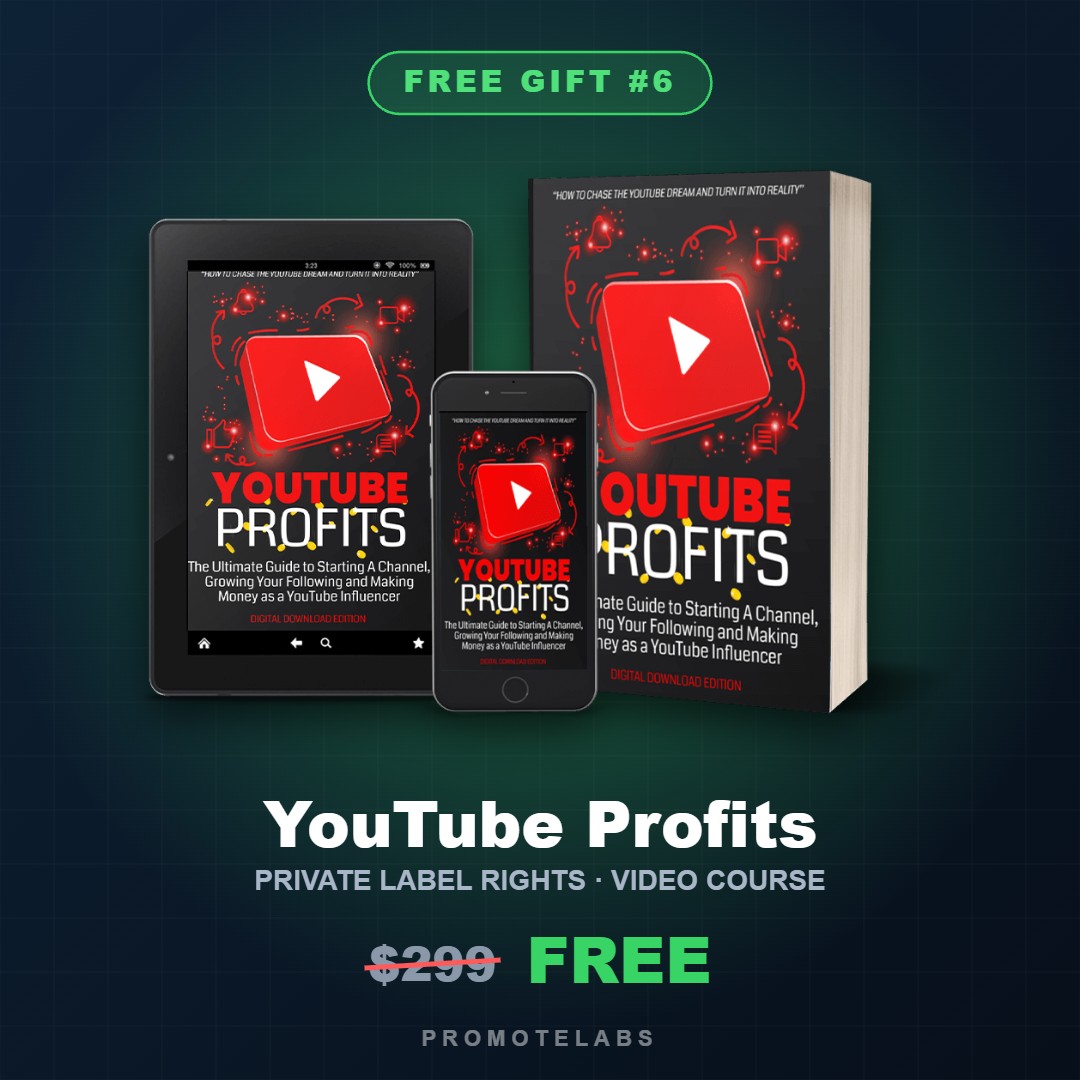
If you want to go deeper on growing and monetizing a channel, YouTube Profits is a five-module course that covers it step by step. It comes with private label rights, so you can learn from it, give it away to grow your list or rebrand it and sell it as your own.
The five modules
| Module | What it covers |
|---|---|
| 1. Chasing the YouTube Dream | Choosing an audience using three factors, standing out from other creators and what it takes to start |
| 2. Video Styles | 23 engaging video styles across five formats that work in any niche |
| 3. Monetisation | Six ways to earn from each video, which can be combined |
| 4. Channel Foundations | Channel setup, ideal video length and writing titles |
| 5. Advanced Strategies | Growth tactics for subscribers, engagement and profit |
Everything included
- The main course: 100 pages and 24,000+ words, in editable DOCX and ready-to-sell PDF.
- A checklist lead magnet: 13 pages, 1,900+ words.
- A gear list designed to earn affiliate commissions: 12 pages, 1,900+ words.
- An editable PSD cover graphic and 7 PNG mockups.
- A professionally written sales letter and an alternative video sales letter script.
- A 5-part promotional email series.
Smart ways to use it
- Sell it as an ebook course with the included sales letter.
- Record it as a video course using the text as your script, which is fitting for a YouTube topic.
- Use the checklist as a lead magnet and the email series to sell the full course.
- Earn affiliate commissions by adding your links to the gear list.
- Run a 10-week coaching class with one module every two weeks.
- Create a challenge, such as 30 days to your first 100 subscribers.
What the license allows
| You can | You cannot |
|---|---|
| Sell the course as-is or edit and rework it | Pass PLR, resale or giveaway rights to customers, subscribers or affiliates |
| Turn it into videos, a membership, coaching material or a 10-week class | Create offers that let others sell or give away the content |
| Use it as a lead magnet, bonus, upsell, webinar or autoresponder sequence | |
| Create slides, infographics, challenges or physical products from it |
How to claim it free
- Visit the PromoteLabs free gifts page.
- Find YouTube Profits and copy the coupon on its card.
- Apply the coupon at checkout to bring the price to $0.
Honest notes
- YouTube changes its features often. Review the course and update any platform details before you sell it.
- Earnings on YouTube vary widely. Avoid income promises when you market the course.
- PLR purchases are not refunded, except for duplicates.
Keep reading
Frequently Asked Questions
How do I grow a YouTube channel in 2026?
Pick a focused topic, make videos people are already searching for, package each one with a clear title and thumbnail, hook viewers in the first 30 seconds, publish consistently and use your analytics to improve.
What videos should a new channel make?
Search-based videos such as tutorials, how-tos, reviews, comparisons and answers to specific questions tend to grow new channels fastest.
Which YouTube analytics matter most?
Click-through rate shows whether your titles and thumbnails earn the click. Average view duration shows whether your content keeps people watching.
Do YouTube Shorts help grow a channel?
They can introduce your channel to new viewers. Turn the best tip from each long video into a short and point viewers to the full version.
How can I make money on YouTube without a big channel?
Affiliate links, your own products, services and email list building can all earn from a small, focused channel in a buying niche.
Where can I get a free YouTube course?
YouTube Profits is a free PLR course and one of the free gifts on the PromoteLabs free gifts page.
DOWNLOAD & SAVE THIS POST >> CLICK HERE <<